Marker Font Review
As a web designer, I often find myself searching for the perfect display font to elevate a project’s visual identity. Marker has become one of my go-to choices for adding a playful yet polished touch to digital layouts. Its simple, hand-drawn aesthetic feels like a breath of fresh air in an otherwise rigid design world.
A Playful Font for Digital Projects
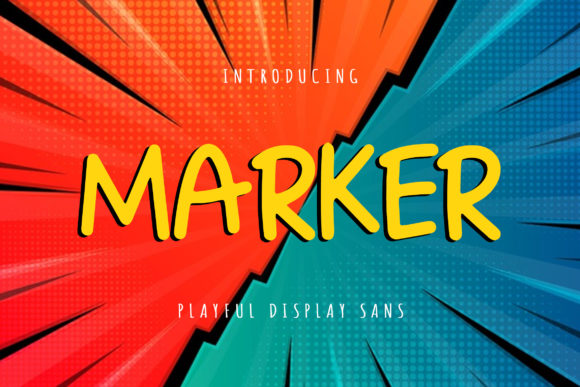
Marker is a display font that leans into its whimsical charm without sacrificing clarity. The letterforms have a slightly irregular edge, giving it a handcrafted feel that works well for creative websites, boutique stores, and personal portfolios. It’s not overly ornate, which makes it versatile for both modern and rustic themes.
I first tested it on a hero section for a small online store selling handmade soaps. The font added a friendly, approachable vibe that complemented the brand’s natural, eco-conscious messaging. It felt right at home alongside soft pastel colors and organic textures.
Marker in Hero Sections and Headers
One of the strongest use cases for Marker is as a headline or header font. Its bold strokes and slight imperfections make it ideal for grabbing attention without overwhelming the viewer. On a landing page for a creative course, I used it for the main title and saw how it helped create a clear visual hierarchy.
When placed over a background image, Marker maintained good contrast and readability. It didn’t get lost in the noise, which is a common issue with more decorative fonts. I also appreciated how it looked on mobile screens—its legibility held up even at smaller sizes, making it a solid choice for responsive designs.
Pairing Marker with Other Fonts
While Marker shines on its own, it pairs beautifully with simpler typefaces. For a blog redesign, I combined it with a clean sans serif for body text. The contrast between the two made the content easier to read while still keeping the site visually engaging.
I also experimented with a serif font for a more editorial look. The combination felt balanced, with Marker providing energy and the serif offering a sense of tradition. This pairing worked especially well for a lifestyle website focused on wellness and mindfulness.
Marker for Call-to-Action Buttons and Decorative Elements
Marker isn’t just for headers. I’ve used it for CTA buttons on product pages, where its playful tone aligned with the brand’s personality. It added a subtle flair without being too distracting. On a course sales page, it helped reinforce the idea of creativity and fun.
It also works well as a decorative accent. I added it to a promotional banner for a seasonal sale, using it for a tagline that stood out against a dark background. The font’s weight and spacing made it easy to read even when overlaid on complex images.
Considerations for Web Use
Marker is best suited for short phrases, titles, and decorative elements. While it’s readable in most contexts, it’s not ideal for long paragraphs or dense blocks of text. I wouldn’t recommend using it for navigation menus or form labels, where clarity is key.
For accessibility, I always test fonts on different backgrounds and screen sizes. Marker performed well on both light and dark themes, though I noticed that some characters were slightly harder to distinguish in smaller sizes. That said, it still maintained enough legibility for most digital applications.
Font Licensing and Web Integration
Before using Marker on a client project, I checked the licensing details. It comes with webfont support, which is essential for digital designers. The file formats included are standard for web use, and the font includes multiple weights and alternates for greater flexibility.
For commercial projects, I made sure to verify that the license covered all intended uses. This is especially important for designers working on e-commerce sites or digital templates that may be sold to other users.
Overall, Marker is a reliable choice for web designers looking to add a touch of personality to their layouts. Its playful yet professional style makes it suitable for a wide range of digital projects, from personal portfolios to boutique online stores. Whether you’re designing a hero section, a call-to-action button, or a branded landing page, Marker can help bring your vision to life with style and clarity.