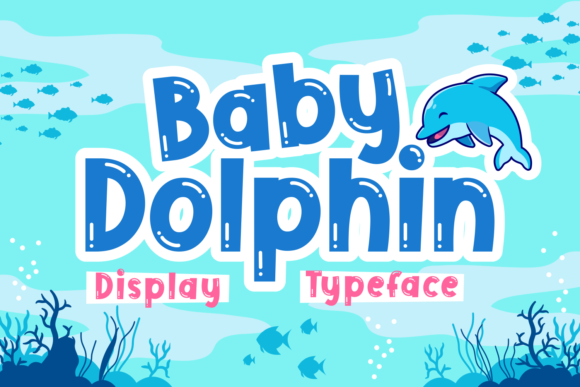
Baby Dolphin Font for Web Design
Baby Dolphin is a display font that brings energy and playfulness to digital design. Its bubbly, bold style makes it ideal for children-themed projects, but its versatility extends beyond that. As a web designer, you can use Baby Dolphin to create engaging visuals that stand out while maintaining clarity and professionalism.
The font has a friendly, approachable personality that works well in headers, banners, and call-to-action buttons. Its rounded shapes and dynamic curves add a sense of movement, making it perfect for creative websites, online stores, and branding projects. Whether you're designing a kids' product landing page or a boutique e-commerce site, Baby Dolphin adds a unique visual flair.
Using Baby Dolphin in Web Layouts
In website headers and hero sections, Baby Dolphin can capture attention and set the tone for the entire experience. When paired with a clean sans serif font for body text, it creates a balanced contrast that enhances readability. This combination is especially effective for landing pages, course sales pages, and blog headers where visual hierarchy is key.
For CTA buttons, Baby Dolphin adds a playful touch without overwhelming the user. It works best when used in short phrases or as part of a logo. On mobile screens, ensure the font size is large enough to maintain legibility. Avoid using it on small buttons or dark backgrounds where the detail might get lost.
In online store banners, Baby Dolphin can highlight promotions or featured products. Its bright, energetic look pairs well with vibrant color schemes. For digital ads and social media graphics, the font helps convey a fun and modern brand identity. When used in portfolio sites, it adds a creative edge to project titles and section headings.
Visual Hierarchy and Brand Tone
Baby Dolphin's distinct character makes it an excellent choice for establishing a strong brand tone. Its boldness supports visual hierarchy by drawing the eye to important elements like headlines and logos. This helps users scan content quickly and understand the structure of a webpage.
When designing for a coaching website or a creative portfolio, Baby Dolphin can reinforce a youthful, innovative brand image. It also works well in editorial designs, such as blog post titles or magazine-style layouts, where a fresh and dynamic look is desired. However, it’s best avoided for long paragraphs or complex data-heavy content due to its decorative nature.
For brand identity, consider using Baby Dolphin as a secondary font alongside a more neutral typeface. This approach maintains consistency while allowing the display font to shine in key areas. It also helps prevent overuse, which could dilute the overall design.
Font Pairing and Digital Applications
Pairing Baby Dolphin with a simple sans serif font like Roboto or Open Sans ensures readability in body text. This pairing is ideal for landing pages, SaaS websites, and online stores where clear communication is essential. For a more traditional feel, pair it with a serif font like Lora or Georgia to create an editorial aesthetic.
In digital ads and banners, Baby Dolphin adds a memorable visual element that aligns with the brand’s message. It’s also useful for packaging design, where a bold and recognizable font can enhance product appeal. When used in logo design, it contributes to a cohesive and professional look.
Ensure the font includes multiple weights and styles if available. This allows for greater flexibility in design, from light headers to bold accents. Check for webfont availability and commercial licensing options, especially if the font will be used across multiple platforms or client projects.
Best Practices for Web Design
When using Baby Dolphin in responsive layouts, test it at different screen sizes to ensure it remains legible. Avoid using it on image overlays or busy backgrounds where it may not stand out. For dark mode themes, consider adjusting the font color to maintain visibility.
As a digital product creator, always verify the font’s licensing terms before incorporating it into a website or client project. Commercial fonts often require proper attribution or purchase for web use. Make sure the file formats are compatible with your design tools and web platforms.
Baby Dolphin is a powerful tool for web designers looking to add personality and energy to their digital work. Whether you're building a creative portfolio, launching an online store, or designing a branded web experience, this font offers a unique way to express your brand’s voice and style.